> ## Documentation Index
> Fetch the complete documentation index at: https://docs.apexlink.com/llms.txt
> Use this file to discover all available pages before exploring further.
# Email Account Management
# **Email Account Management**
## **Overview**
BXMail provides administrators with a centralized interface for managing email accounts under each domain.
After logging in with an administrator account, mailbox accounts for the current domain can be managed directly from the control panel.
***
# **Accessing Domain Account Management**
To manage email accounts for a domain:
1. Log in using the domain administrator account
2. Navigate to:
```text theme={null}
More → Domain Settings → Accounts
```
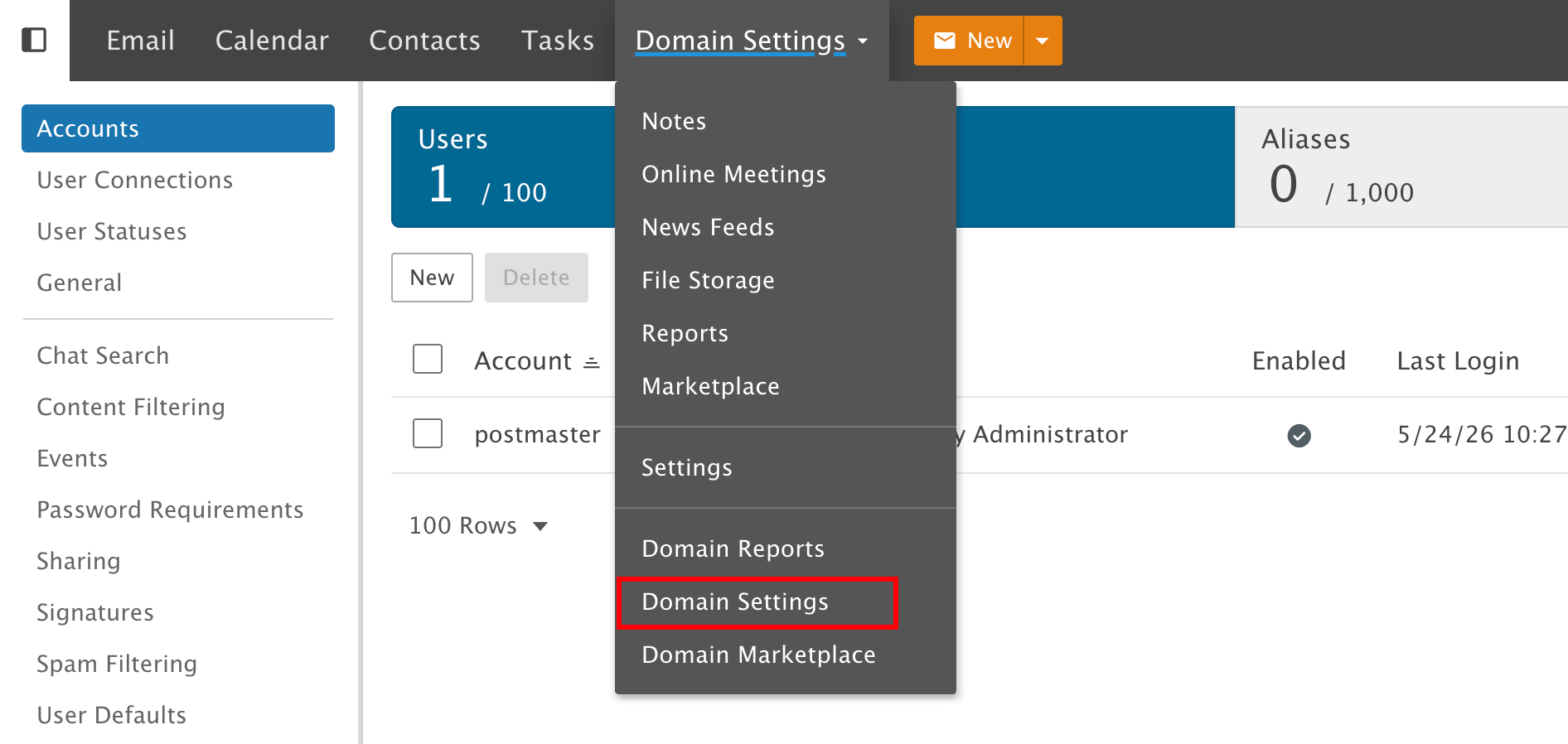 From this section, administrators can:
* Create new mailbox accounts
* Edit existing accounts
* Reset or change passwords
* Configure mailbox display names
* Manage mailbox storage limits
***
# **Creating a New Mailbox Account**
When creating a new mailbox account, the following information is required:
| **Field** | **Description** |
| :--------------- | :------------------------------------ |
| Username | The mailbox name / email account name |
| Password | Login password for the mailbox |
| Confirm Password | Password confirmation |
From this section, administrators can:
* Create new mailbox accounts
* Edit existing accounts
* Reset or change passwords
* Configure mailbox display names
* Manage mailbox storage limits
***
# **Creating a New Mailbox Account**
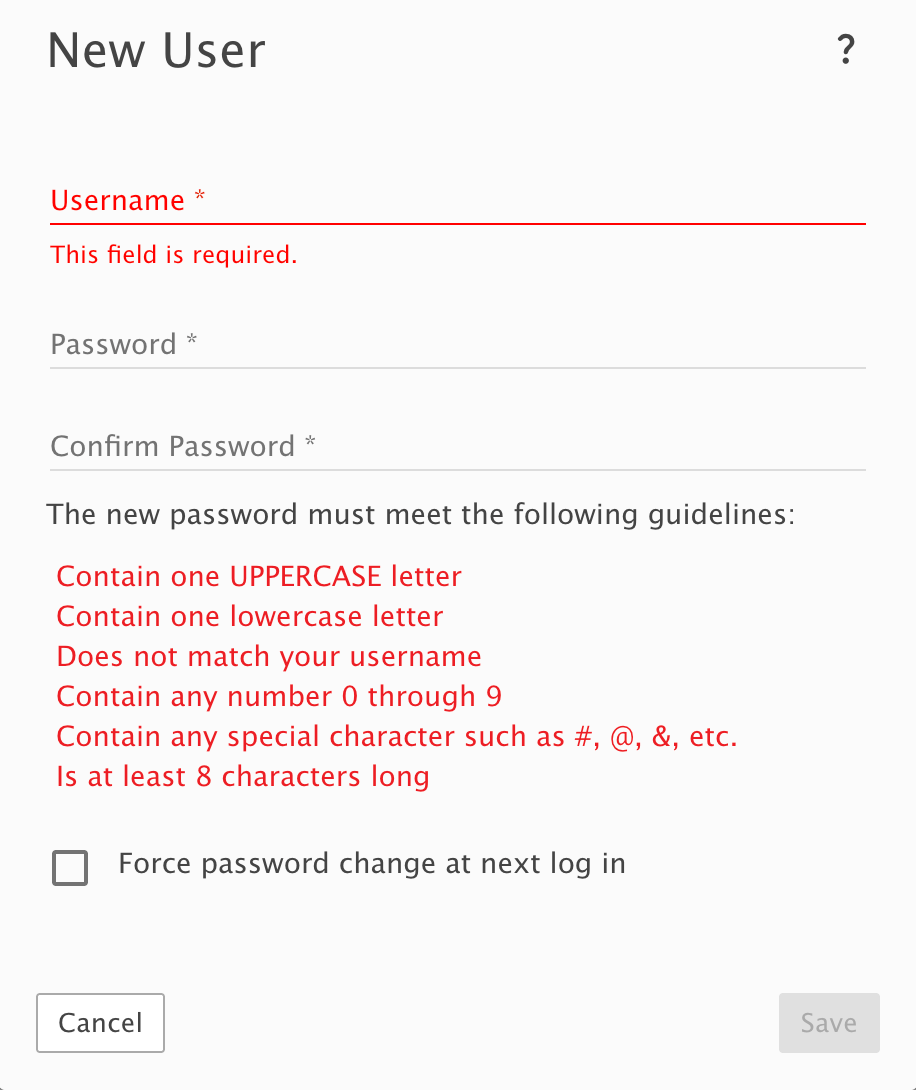
When creating a new mailbox account, the following information is required:
| **Field** | **Description** |
| :--------------- | :------------------------------------ |
| Username | The mailbox name / email account name |
| Password | Login password for the mailbox |
| Confirm Password | Password confirmation |
 ## **Username**
The **Username** represents the mailbox name for the email address.
Example:
```text theme={null}
Username: support
Email Address: support@example.com
```
***
# **Password Requirements**
Passwords must meet the following security requirements:
* Contain at least one uppercase letter
* Contain at least one lowercase letter
* Include at least one number
* Include at least one special character
* Be at least 8 characters long
* Must not match the username
Administrators can also enable:
* Force password change at next login
***
# **Managing Existing Mailbox Accounts**
After selecting an existing mailbox account, administrators can configure additional account settings.
Available management functions include:
| **Function** | **Description** |
| :--------------------- | :------------------------------- |
| Change Password | Reset or update mailbox password |
| Expire Password | Force password expiration |
| Reindex | Rebuild mailbox search index |
| Recalculate Disk Usage | Refresh mailbox storage usage |
| Resync Devices | Re-sync connected devices |
| | |
## **Username**
The **Username** represents the mailbox name for the email address.
Example:
```text theme={null}
Username: support
Email Address: support@example.com
```
***
# **Password Requirements**
Passwords must meet the following security requirements:
* Contain at least one uppercase letter
* Contain at least one lowercase letter
* Include at least one number
* Include at least one special character
* Be at least 8 characters long
* Must not match the username
Administrators can also enable:
* Force password change at next login
***
# **Managing Existing Mailbox Accounts**
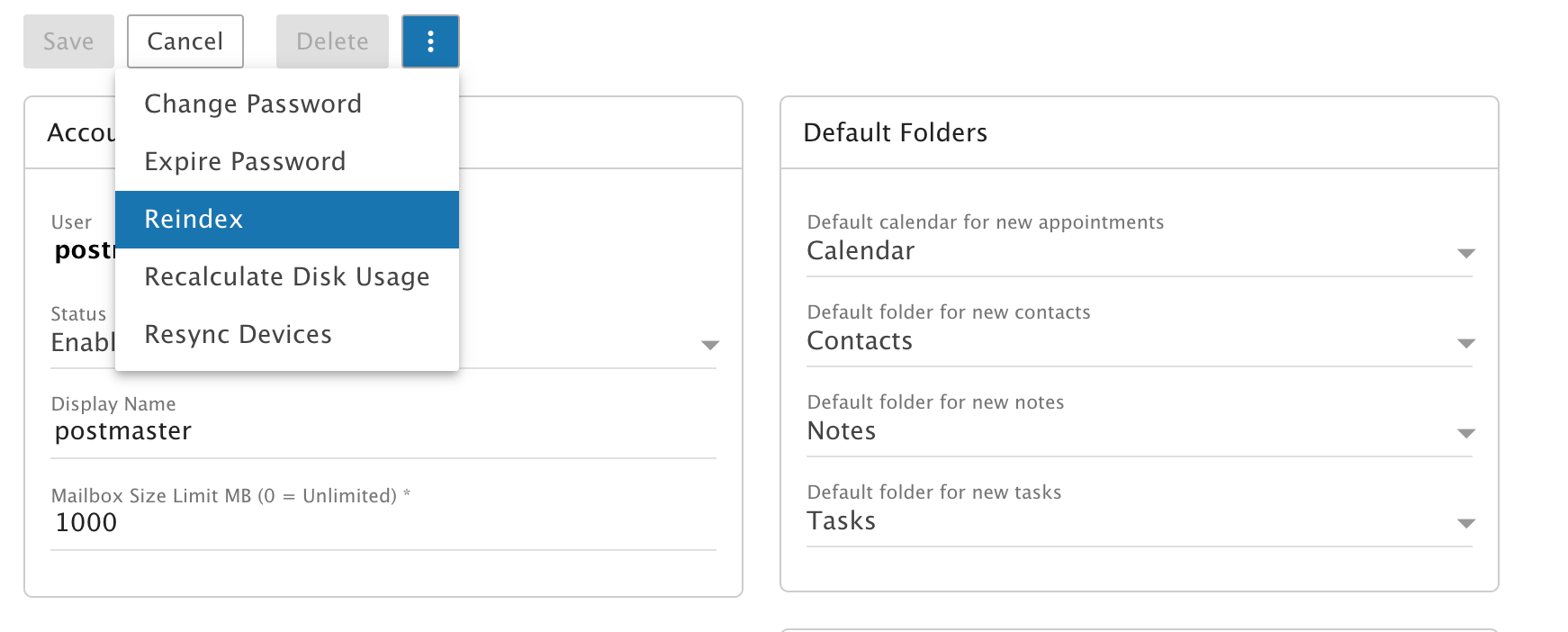
After selecting an existing mailbox account, administrators can configure additional account settings.
Available management functions include:
| **Function** | **Description** |
| :--------------------- | :------------------------------- |
| Change Password | Reset or update mailbox password |
| Expire Password | Force password expiration |
| Reindex | Rebuild mailbox search index |
| Recalculate Disk Usage | Refresh mailbox storage usage |
| Resync Devices | Re-sync connected devices |
| | |
 ***
# **Configuring Display Name**
Administrators can configure the mailbox display name shown in outgoing emails.
Example:
```text theme={null}
Username: postmaster
Display Name: BXMail Support
```
The display name helps recipients identify the sender more clearly.
***
# **Mailbox Storage Configuration**
Each mailbox account can have an individual mailbox size limit configured.
Example:
| **Mailbox** | **Storage Limit** |
| :------------------------------------------------ | :---------------- |
| [support@example.com](mailto:support@example.com) | 1GB |
| [sales@example.com](mailto:sales@example.com) | 5GB |
| [admin@example.com](mailto:admin@example.com) | Unlimited |
Setting the mailbox size to `0` means unlimited storage.
***
# **Additional Features**
Administrators can also manage:
* Account status
* Default folders
* Calendar settings
* Contacts
* Notes
* Tasks synchronization
***
# **Benefits of Centralized Account Management**
* Easy mailbox administration
* Flexible password management
* Per-user storage control
* Secure account policies
* Centralized domain management
* Simplified maintenance and support
***
# **Configuring Display Name**
Administrators can configure the mailbox display name shown in outgoing emails.
Example:
```text theme={null}
Username: postmaster
Display Name: BXMail Support
```
The display name helps recipients identify the sender more clearly.
***
# **Mailbox Storage Configuration**
Each mailbox account can have an individual mailbox size limit configured.
Example:
| **Mailbox** | **Storage Limit** |
| :------------------------------------------------ | :---------------- |
| [support@example.com](mailto:support@example.com) | 1GB |
| [sales@example.com](mailto:sales@example.com) | 5GB |
| [admin@example.com](mailto:admin@example.com) | Unlimited |
Setting the mailbox size to `0` means unlimited storage.
***
# **Additional Features**
Administrators can also manage:
* Account status
* Default folders
* Calendar settings
* Contacts
* Notes
* Tasks synchronization
***
# **Benefits of Centralized Account Management**
* Easy mailbox administration
* Flexible password management
* Per-user storage control
* Secure account policies
* Centralized domain management
* Simplified maintenance and support